[](https://github.com/firstcontributions/open-source-badges)
[ ](https://join.slack.com/t/firstcontributors/shared_invite/zt-1hg51qkgm-Xc7HxhsiPYNN3ofX2_I8FA)
[](https://opensource.org/licenses/MIT)
[](https://www.codetriage.com/roshanjossey/first-contributions)
# First Contributions
Dis project dey to make am simple and guide beginners how dem go make their first contribution. If you wan make your first contribution, follow these steps wey dey below.
_If command line no dey comfortable for you, [see tutorials wey use GUI tools here.](#tutorials-using-other-tools)_
](https://join.slack.com/t/firstcontributors/shared_invite/zt-1hg51qkgm-Xc7HxhsiPYNN3ofX2_I8FA)
[](https://opensource.org/licenses/MIT)
[](https://www.codetriage.com/roshanjossey/first-contributions)
# First Contributions
Dis project dey to make am simple and guide beginners how dem go make their first contribution. If you wan make your first contribution, follow these steps wey dey below.
_If command line no dey comfortable for you, [see tutorials wey use GUI tools here.](#tutorials-using-other-tools)_
 #### If you no get git for your machine, [install am](https://docs.github.com/en/get-started/quickstart/set-up-git).
## Fork this repository
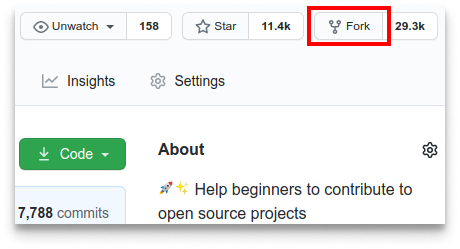
Fork this repository by clicking on the fork button for the top of this page.
Dis one go create copy of dis repository for your account.
## Clone the repository
#### If you no get git for your machine, [install am](https://docs.github.com/en/get-started/quickstart/set-up-git).
## Fork this repository
Fork this repository by clicking on the fork button for the top of this page.
Dis one go create copy of dis repository for your account.
## Clone the repository
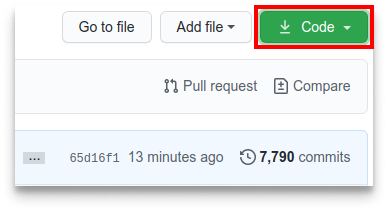 Now clone the forked repository go your machine. Go to your GitHub account, open the forked repository, click on the code button and then click the _copy to clipboard_ icon.
Open a terminal and run the following git command:
```bash
git clone "url wey you just copy"
```
where "url wey you just copy" (without the quotation marks) na the url to this repository (your fork of this project). See the previous steps to get the url.
Now clone the forked repository go your machine. Go to your GitHub account, open the forked repository, click on the code button and then click the _copy to clipboard_ icon.
Open a terminal and run the following git command:
```bash
git clone "url wey you just copy"
```
where "url wey you just copy" (without the quotation marks) na the url to this repository (your fork of this project). See the previous steps to get the url.
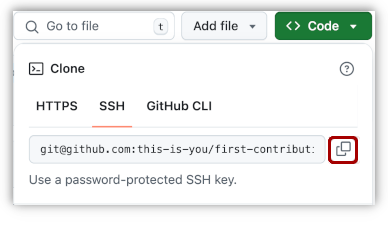 For example:
```
git clone git@github.com:this-is-you/first-contributions.git
```
where this-is-you na your GitHub username. Here you dey copy the contents of the first-contributions repository for GitHub go your computer.
## Create a branch
Change go the repository directory for your computer (if you no dey there already):
```
cd first-contributions
```
Now create a branch using the git switch command:
```
git switch -c your-new-branch-name
```
For example:
```
git switch -c add-desmond-ezo-ojile
```
## Make necessary changes and commit those changes
Now open Contributors.md file for a text editor, add your name to am. No add am for the beginning or end of the file. Put am anywhere for middle. Now, save the file.
For example:
```
git clone git@github.com:this-is-you/first-contributions.git
```
where this-is-you na your GitHub username. Here you dey copy the contents of the first-contributions repository for GitHub go your computer.
## Create a branch
Change go the repository directory for your computer (if you no dey there already):
```
cd first-contributions
```
Now create a branch using the git switch command:
```
git switch -c your-new-branch-name
```
For example:
```
git switch -c add-desmond-ezo-ojile
```
## Make necessary changes and commit those changes
Now open Contributors.md file for a text editor, add your name to am. No add am for the beginning or end of the file. Put am anywhere for middle. Now, save the file.
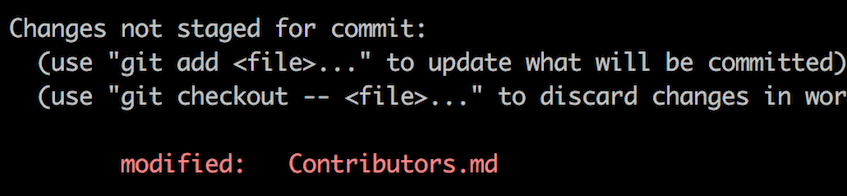 If you go to the project directory and run the command git status, you go see say changes dey.
Add those changes to the branch wey you just create using the git add command:
```
git add Contributors.md
```
Now commit those changes using the git commit command:
```
git commit -m "Add your-name to Contributors list"
```
replace your-name with your own name.
## Push changes to GitHub
Push your changes using the command git push:
```
git push -u origin your-branch-name
```
replace your-branch-name with the name of the branch wey you create before.
If you go to the project directory and run the command git status, you go see say changes dey.
Add those changes to the branch wey you just create using the git add command:
```
git add Contributors.md
```
Now commit those changes using the git commit command:
```
git commit -m "Add your-name to Contributors list"
```
replace your-name with your own name.
## Push changes to GitHub
Push your changes using the command git push:
```
git push -u origin your-branch-name
```
replace your-branch-name with the name of the branch wey you create before.
If you get any errors while pushing, click here:
## Authentication Error
remote: Support for password authentication don remove since August 13, 2021. Please use a personal access token instead.
remote: Please see https://github.blog/2020-12-15-token-authentication-requirements-for-git-operations/ for more information.
fatal: Authentication failed for 'https://github.com//first-contributions.git/'
Go to GitHub's tutorial on how to generate and add SSH key to your account.
## Submit your changes for review
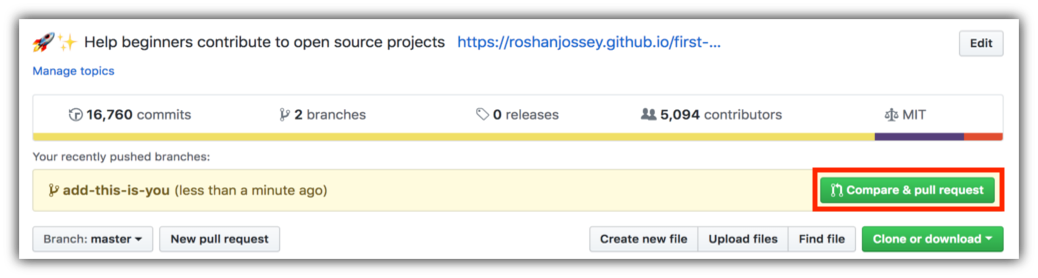
If you go to your repository on GitHub, you go see Compare & pull request button. Click on that button.
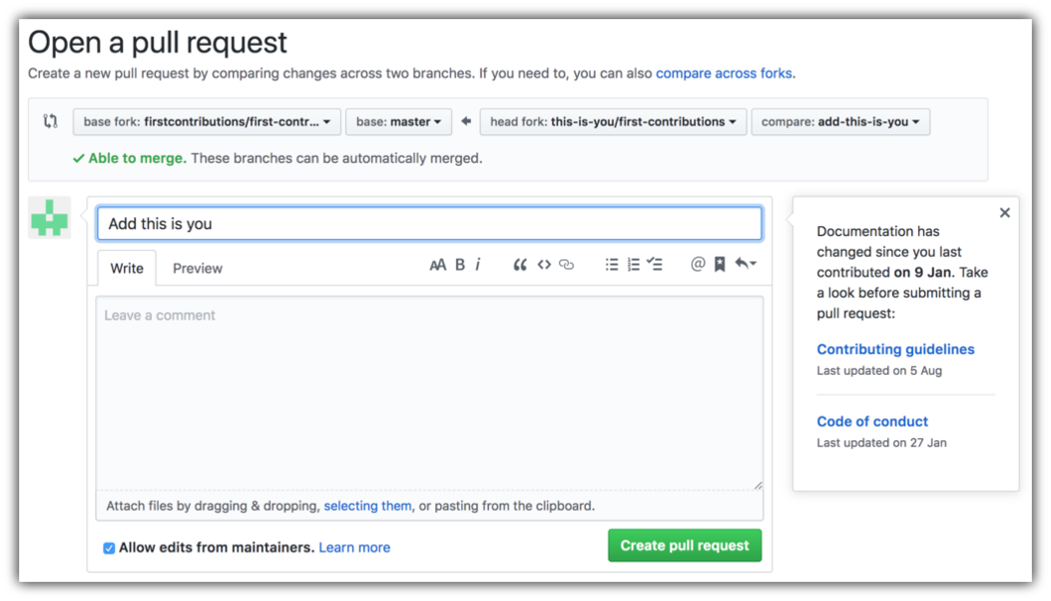
 Now submit the pull request.
 Soon I go merge all your changes into the main branch of this project. You go get notification email once the changes don merge.
## Where to go from here?
Congrats!
Soon I go merge all your changes into the main branch of this project. You go get notification email once the changes don merge.
## Where to go from here?
Congrats!