[](https://github.com/ellerbrock/open-source-badges/)
[ ](https://join.slack.com/t/firstcontributors/shared_invite/zt-1hg51qkgm-Xc7HxhsiPYNN3ofX2_I8FA)
[](https://opensource.org/licenses/MIT)
[](https://www.codetriage.com/roshanjossey/first-contributions)
# First Contributions(首次贡献)
|
](https://join.slack.com/t/firstcontributors/shared_invite/zt-1hg51qkgm-Xc7HxhsiPYNN3ofX2_I8FA)
[](https://opensource.org/licenses/MIT)
[](https://www.codetriage.com/roshanjossey/first-contributions)
# First Contributions(首次贡献)
|  | Git Bash Edition |
| ------------------------------------------------------------------------------------------------------------------ | ---------------- |
第一次做一件事总是很难,特别是涉及协作的时候,犯错并不是一件让人舒服的事。但开源正是关于协作与共同进步的。我们希望简化新手首次学习和参与开源贡献的流程。
阅读文章和看教程固然有用,但没有什么比“亲自动手且不会搞砸任何事情”更有效。本项目旨在为新手提供引导,简化首次贡献的过程。请记住:你越放松,学得越快。如果你正想要完成你的第一次贡献,只需按照下列简单步骤操作。我们保证这将非常有趣!
如果你还没有在 Windows 上安装 Git Bash,请[点击这里安装](https://git-scm.com/download/win)。
| Git Bash Edition |
| ------------------------------------------------------------------------------------------------------------------ | ---------------- |
第一次做一件事总是很难,特别是涉及协作的时候,犯错并不是一件让人舒服的事。但开源正是关于协作与共同进步的。我们希望简化新手首次学习和参与开源贡献的流程。
阅读文章和看教程固然有用,但没有什么比“亲自动手且不会搞砸任何事情”更有效。本项目旨在为新手提供引导,简化首次贡献的过程。请记住:你越放松,学得越快。如果你正想要完成你的第一次贡献,只需按照下列简单步骤操作。我们保证这将非常有趣!
如果你还没有在 Windows 上安装 Git Bash,请[点击这里安装](https://git-scm.com/download/win)。
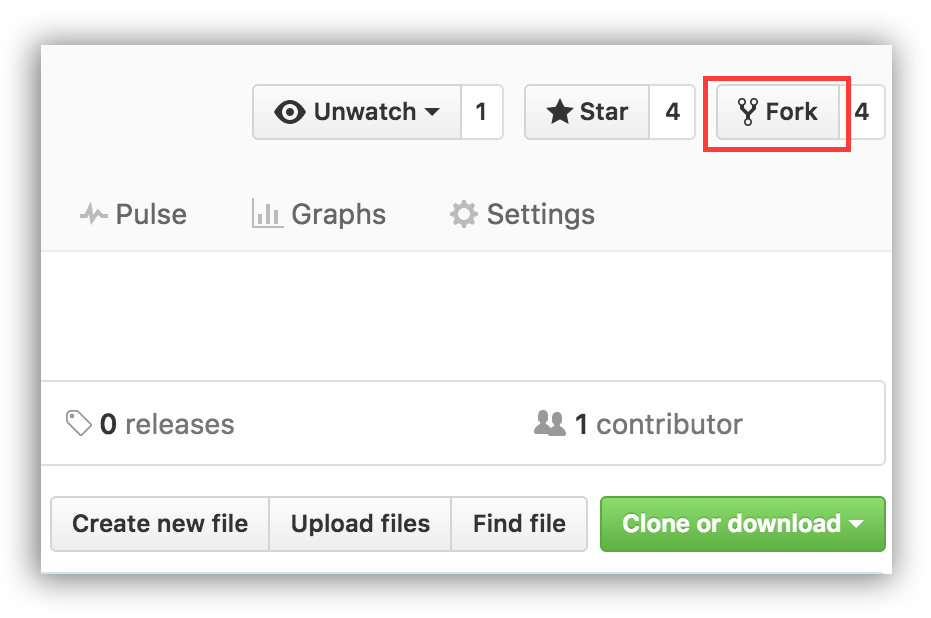 ## Fork 本仓库
点击本页面右上角的 Fork 按钮,即可 Fork 此仓库。
这将在你的 GitHub 账户中创建一个副本。
## 克隆这个仓库
现在将此仓库克隆到你的本地机器。
**重要:不要克隆原始仓库。请到你自己的 fork 页面进行克隆。**
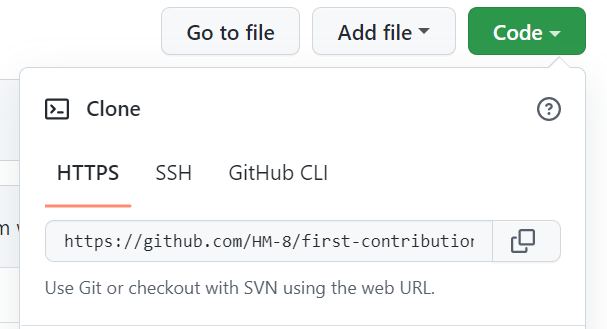
点击 "Code",然后复制下方的链接。
## Fork 本仓库
点击本页面右上角的 Fork 按钮,即可 Fork 此仓库。
这将在你的 GitHub 账户中创建一个副本。
## 克隆这个仓库
现在将此仓库克隆到你的本地机器。
**重要:不要克隆原始仓库。请到你自己的 fork 页面进行克隆。**
点击 "Code",然后复制下方的链接。
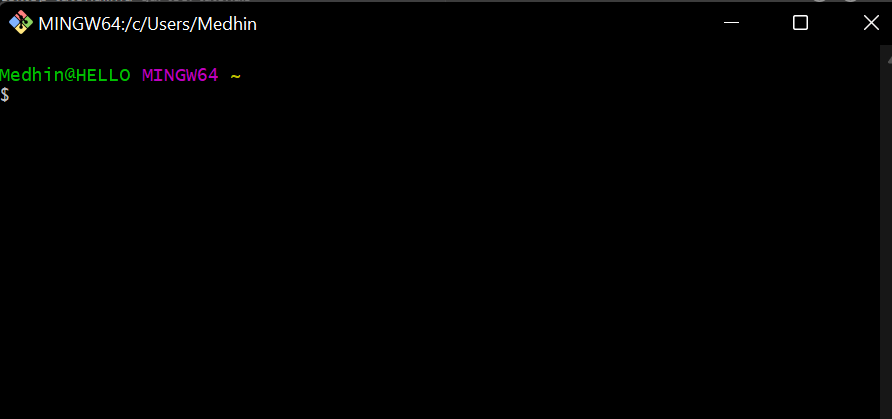
 打开你刚下载的 Git Bash 应用。如果是在 Windows 上,它看起来应该如下图所示。
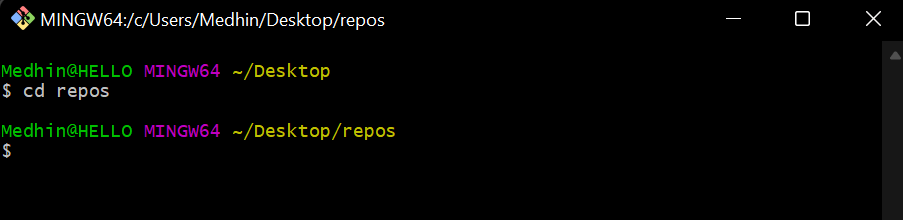
 使用以下命令进入你希望保存项目的文件夹:
```bash
cd
```
使用以下命令进入你希望保存项目的文件夹:
```bash
cd
```
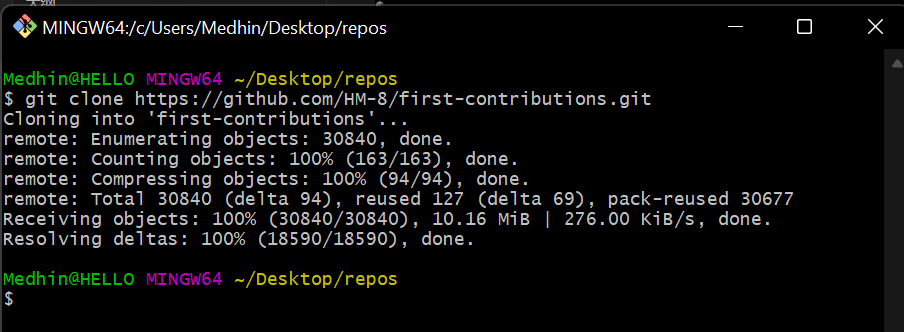
 使用你刚刚复制的链接,运行以下命令克隆仓库:
```bash
git clone
```
使用你刚刚复制的链接,运行以下命令克隆仓库:
```bash
git clone
```
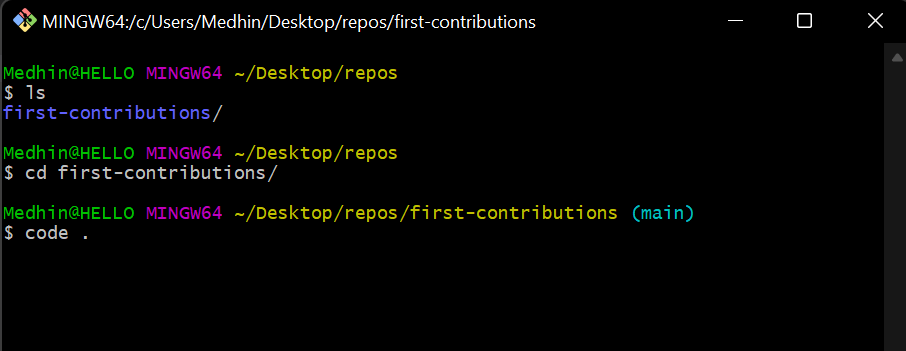
 进入该目录,并在 VS Code 中打开项目进行修改。
 ## 创建分支
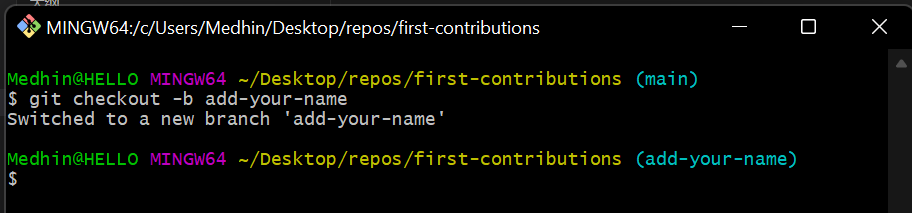
使用以下命令创建分支并切换到该分支:
```bash
git checkout -b
```
将 ``替换为例如 "add-james-smith" 的格式。
## 创建分支
使用以下命令创建分支并切换到该分支:
```bash
git checkout -b
```
将 ``替换为例如 "add-james-smith" 的格式。
 ## 做出必要修改并提交更改
使用文本编辑器打开 `Contributors.md` 文件,滚动到页面底部,添加你的名字,然后保存文件。
例如,如果你叫 James Smith,添加如下内容:
\[James Smith](https://github.com/jamessmith)
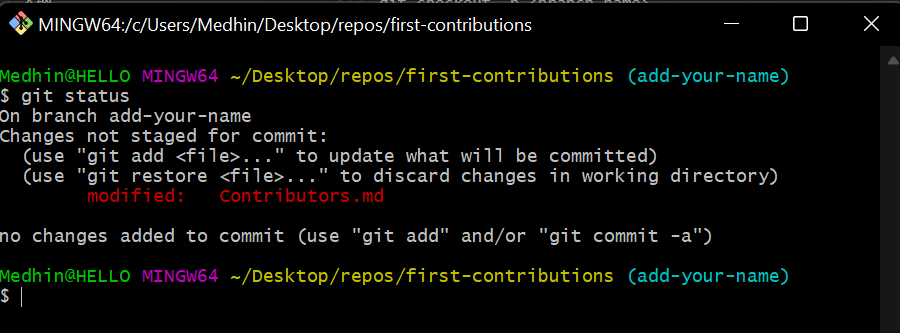
你可以通过运行以下命令查看是否有文件更改:
```bash
git status
```
## 做出必要修改并提交更改
使用文本编辑器打开 `Contributors.md` 文件,滚动到页面底部,添加你的名字,然后保存文件。
例如,如果你叫 James Smith,添加如下内容:
\[James Smith](https://github.com/jamessmith)
你可以通过运行以下命令查看是否有文件更改:
```bash
git status
```
 现在提交你的更改:
首先将更改添加到暂存区:
```bash
git add file-name
```
然后使用以下命令提交更改:
```bash
git commit -m "Add your-name to Contributors list"
```
请将 `` 替换为你的名字。
现在提交你的更改:
首先将更改添加到暂存区:
```bash
git add file-name
```
然后使用以下命令提交更改:
```bash
git commit -m "Add your-name to Contributors list"
```
请将 `` 替换为你的名字。
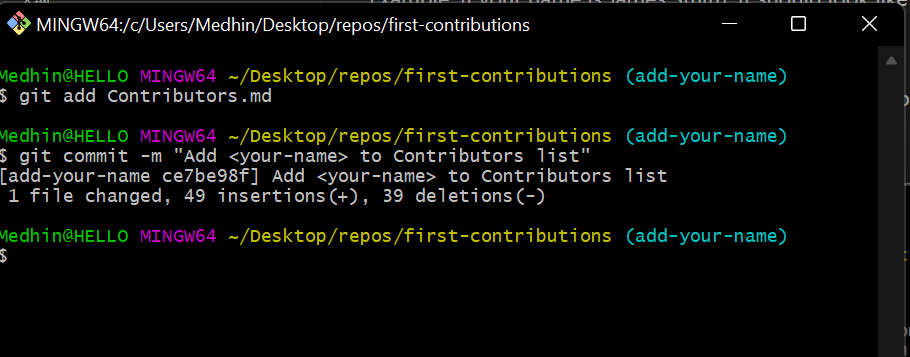 你可以使用 `git log --oneline` 命令确认提交记录。
## 推送更改到 GitHub
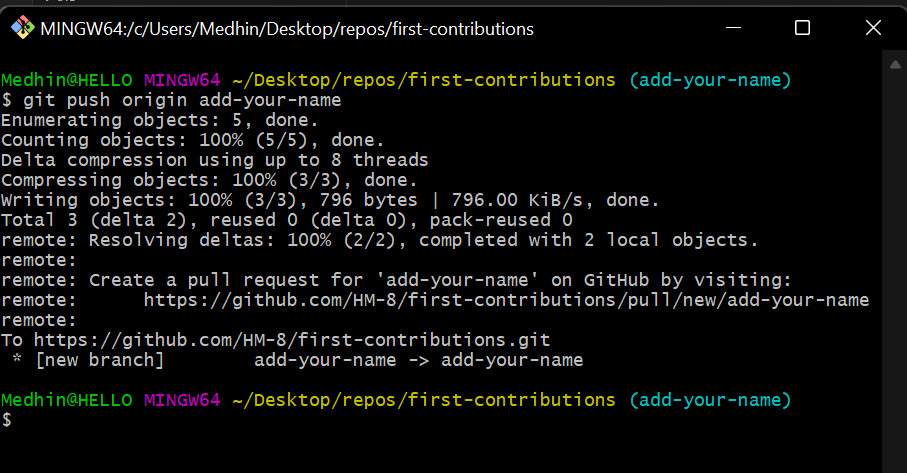
完成上述步骤后,使用以下命令将更改推送到 GitHub:
```bash
git push origin
```
你可以使用 `git log --oneline` 命令确认提交记录。
## 推送更改到 GitHub
完成上述步骤后,使用以下命令将更改推送到 GitHub:
```bash
git push origin
```
 ## 提交更改供审查
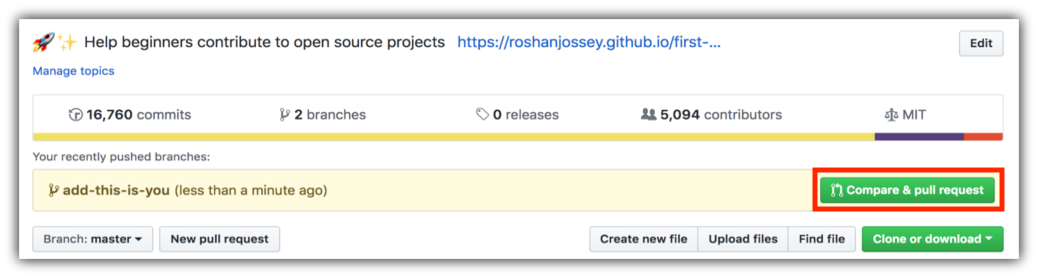
访问你的 GitHub 仓库页面,会看到 `Compare & pull request` 按钮。点击它。
## 提交更改供审查
访问你的 GitHub 仓库页面,会看到 `Compare & pull request` 按钮。点击它。
 点击提交 pull request.
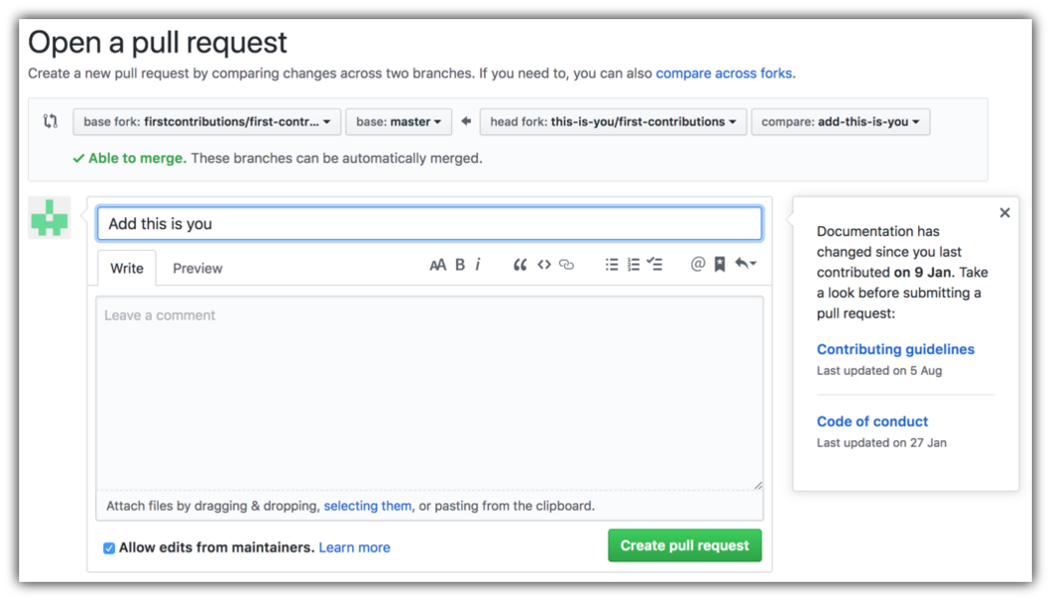 不久之后,我会将你的更改合并到主分支中。合并后你会收到邮件通知。
## Where to go from here?
恭喜你!你刚完成了标准的 - fork -> clone -> edit -> PR 工作流程,这是你未来在开源项目中常会用到的模式!
你可以通过访问 [web app](https://firstcontributions.github.io#social-share)与朋友分享你的贡献。
如果你有任何问题或需要帮助,欢迎加入我们的 Slack 团队: [Join slack team](https://join.slack.com/t/firstcontributors/shared_invite/zt-1hg51qkgm-Xc7HxhsiPYNN3ofX2_I8FA).
### [Additional material](../additional-material/git_workflow_scenarios/additional-material.md)
## 使用其他工具的教程
[Back to main page](https://github.com/firstcontributions/first-contributions#tutorials-using-other-tools)
不久之后,我会将你的更改合并到主分支中。合并后你会收到邮件通知。
## Where to go from here?
恭喜你!你刚完成了标准的 - fork -> clone -> edit -> PR 工作流程,这是你未来在开源项目中常会用到的模式!
你可以通过访问 [web app](https://firstcontributions.github.io#social-share)与朋友分享你的贡献。
如果你有任何问题或需要帮助,欢迎加入我们的 Slack 团队: [Join slack team](https://join.slack.com/t/firstcontributors/shared_invite/zt-1hg51qkgm-Xc7HxhsiPYNN3ofX2_I8FA).
### [Additional material](../additional-material/git_workflow_scenarios/additional-material.md)
## 使用其他工具的教程
[Back to main page](https://github.com/firstcontributions/first-contributions#tutorials-using-other-tools)