[](https://github.com/ellerbrock/open-source-badges/)
[](https://opensource.org/licenses/MIT)
[](https://www.codetriage.com/roshanjossey/first-contributions)
## የመጀመሪያ አስተዋፅኦዎች
ይህ ፕሮጀክት ጀማሪዎች የመጀመሪያ አስተዋጾ የሚያደርጉበትን መንገድ ለማቅለል እና ለመምራት ያለመ ነው። የመጀመሪያዎን አስተዋፅዖ ለማድረግ ከፈለጉ ከታች ያሉትን ደረጃዎች ይከተሉ።
_በcommand line(ተርሚናል) ካልተመቸዎት፣ [የGUI መሳሪያዎችን ለመጠቀም አጋዥ ስልጠናዎች እዚህ ያገኛሉ።](#የሌሎች-መሳሪያዎች-አጠቃቀም-አጋዥ-ስልጠናዎች)_
 ### በማሽንዎ ላይ ጊት(git) ከሌለዎት ፤ [ይጫኑት](https://docs.github.com/en/get-started/quickstart/set-up-git) ።
## ይህንን ማከማቻ **fork** ያድርጉ
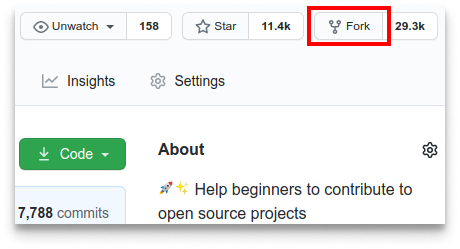
በዚህ ገጽ ላይኛው ክፍል ላይ ያለውን የfork button ጠቅ በማድረግ ይህንን ማከማቻ fork ያድርጉት።
ይህ በእርስዎ account ውስጥ የዚህን repository ቅጂ ይፈጥራል።
## የማከማቻውን ተመሳሳይ ይፍጠሩ (Clone)
### በማሽንዎ ላይ ጊት(git) ከሌለዎት ፤ [ይጫኑት](https://docs.github.com/en/get-started/quickstart/set-up-git) ።
## ይህንን ማከማቻ **fork** ያድርጉ
በዚህ ገጽ ላይኛው ክፍል ላይ ያለውን የfork button ጠቅ በማድረግ ይህንን ማከማቻ fork ያድርጉት።
ይህ በእርስዎ account ውስጥ የዚህን repository ቅጂ ይፈጥራል።
## የማከማቻውን ተመሳሳይ ይፍጠሩ (Clone)
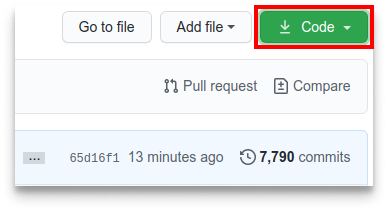 አሁን fork የተደረገውን ማከማቻ (repository) ቅጂ በማሽንዎ(በኮምፒውተርዎ) ይፍጥሩ። ወደ GitHub (account)መለያዎ ይሂዱ፤ fork የተደረገውን ማከማቻ ይክፈቱ፤ ኮድ የሚለውን button ጠቅ ያድርጉ እና ከዚያ *ወደ clipboard ቅዳ* የሚለውን ጠቅ ያድርጉ::
ተርሚናል ይክፈቱ እና የሚከተለውን የgit ትዕዛዝ run ያድርጉ:
```bash
git clone "የቀዱትን url"
```
"አሁን የገለበጡት url" (ያለ ጥቅስ ምልክቶቹ) የማከማቻው (የዚህ ፕሮጀክት fork) url ነው። urlን ለማግኘት የቀደመውን ደረጃዎች ይመልከቱ።
አሁን fork የተደረገውን ማከማቻ (repository) ቅጂ በማሽንዎ(በኮምፒውተርዎ) ይፍጥሩ። ወደ GitHub (account)መለያዎ ይሂዱ፤ fork የተደረገውን ማከማቻ ይክፈቱ፤ ኮድ የሚለውን button ጠቅ ያድርጉ እና ከዚያ *ወደ clipboard ቅዳ* የሚለውን ጠቅ ያድርጉ::
ተርሚናል ይክፈቱ እና የሚከተለውን የgit ትዕዛዝ run ያድርጉ:
```bash
git clone "የቀዱትን url"
```
"አሁን የገለበጡት url" (ያለ ጥቅስ ምልክቶቹ) የማከማቻው (የዚህ ፕሮጀክት fork) url ነው። urlን ለማግኘት የቀደመውን ደረጃዎች ይመልከቱ።
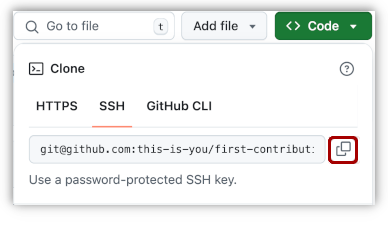 ለምሳሌ:-
```bash
git clone git@github.com:ይህ-እርስዎ-ኖት/first-contributions.git
```
'ይህ-እርስዎ-ኖት' የእርሶ GitHub ተጠቃሚ username ነው። አሁን በ GitHub ላይ ያለውን የመጀመሪያ አስተዋፅዖ(first-contributions) ማከማቻ ይዘቶችን ወደ ኮምፒውተርዎ እየገለበጡ ነው።
## ቅርንጫፍ ይፍጠሩ
በኮምፒተርዎ ላይ ወዳለው የማከማቻ ማህደር ይግቡ (እዚያው ከሌሉ ማለት ነው!)፡
```bash
cd first-contributions
```
አሁን የ‹git switch› ትዕዛዝን በመጠቀም ቅርንጫፍ ይፍጠሩ፡
```bash
git switch -c የእርስዎ-አዲሱ-ቅርንጫፍ-ስም
```
ለምሳሌ:-
```bash
git switch -c ይሁን-አለማየሁ
```
## አስፈላጊ ለውጦችን ያድርጉ እና ለውጦችን ይፈጥሙ (commit)
አሁን የ‹[Contributors.md](http://contributors.md/)› ፋይልን በጽሑፍ አርታኢ ውስጥ ይክፈቱ እና ስምዎትን ይጨምሩበት። በፋይሉ መጀመሪያ ወይም መጨረሻ ላይ አይጨምሩት። በመካከል የትኛውም ቦታ ላይ ያስቀምጡት። አሁን, ፋይሉን save ያድርጉ።
ለምሳሌ:-
```bash
git clone git@github.com:ይህ-እርስዎ-ኖት/first-contributions.git
```
'ይህ-እርስዎ-ኖት' የእርሶ GitHub ተጠቃሚ username ነው። አሁን በ GitHub ላይ ያለውን የመጀመሪያ አስተዋፅዖ(first-contributions) ማከማቻ ይዘቶችን ወደ ኮምፒውተርዎ እየገለበጡ ነው።
## ቅርንጫፍ ይፍጠሩ
በኮምፒተርዎ ላይ ወዳለው የማከማቻ ማህደር ይግቡ (እዚያው ከሌሉ ማለት ነው!)፡
```bash
cd first-contributions
```
አሁን የ‹git switch› ትዕዛዝን በመጠቀም ቅርንጫፍ ይፍጠሩ፡
```bash
git switch -c የእርስዎ-አዲሱ-ቅርንጫፍ-ስም
```
ለምሳሌ:-
```bash
git switch -c ይሁን-አለማየሁ
```
## አስፈላጊ ለውጦችን ያድርጉ እና ለውጦችን ይፈጥሙ (commit)
አሁን የ‹[Contributors.md](http://contributors.md/)› ፋይልን በጽሑፍ አርታኢ ውስጥ ይክፈቱ እና ስምዎትን ይጨምሩበት። በፋይሉ መጀመሪያ ወይም መጨረሻ ላይ አይጨምሩት። በመካከል የትኛውም ቦታ ላይ ያስቀምጡት። አሁን, ፋይሉን save ያድርጉ።
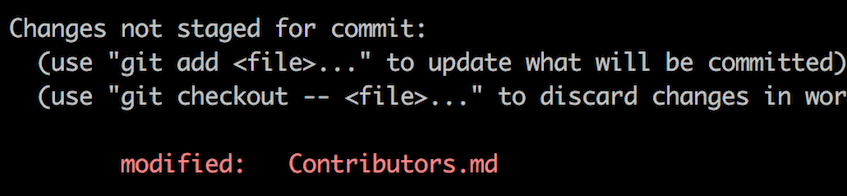 ወደ የፕሮጀክት ማህደሩ ሄደው ይህን ትዕዛዝ (`git status`) ከፈጸሙ፣ ለውጦች እንዳሉ ያያሉ።
የ‹git add› ትዕዛዙን በመጠቀም እነዚያን ለውጦች ወደ ፈጠሩት ቅርንጫፍ ያክሉ።
```bash
git add Contributors.md
```
አሁን የ‹git commit› ትዕዛዙን በመጠቀም እነዚህን ለውጦች ያድርጉ፡:
```bash
git commit -m "የአስተዋጽዖ አበርካቾች ዝርዝር ውስጥ የእርስዎን-ስም ያክሉ"
```
'የእርስዎን-ስም' የሚለውን በስምዎ ይተኩ፡፡
## ለውጦችን ወደ GitHub ይግፉ
‹git push› የሚለውን ትዕዛዝ በመጠቀም ለውጦችዎን ይግፉ፡፡
```bash
git push -u origin የእርስዎ-ቅርንጫፍ-ስም
```
ቀደም ብለዉ በፈጠሩት የቅርንጫፍ ስም 'የእርስዎን-ቅርንጫፍ-ስም'ን ይትኩ።
ወደ የፕሮጀክት ማህደሩ ሄደው ይህን ትዕዛዝ (`git status`) ከፈጸሙ፣ ለውጦች እንዳሉ ያያሉ።
የ‹git add› ትዕዛዙን በመጠቀም እነዚያን ለውጦች ወደ ፈጠሩት ቅርንጫፍ ያክሉ።
```bash
git add Contributors.md
```
አሁን የ‹git commit› ትዕዛዙን በመጠቀም እነዚህን ለውጦች ያድርጉ፡:
```bash
git commit -m "የአስተዋጽዖ አበርካቾች ዝርዝር ውስጥ የእርስዎን-ስም ያክሉ"
```
'የእርስዎን-ስም' የሚለውን በስምዎ ይተኩ፡፡
## ለውጦችን ወደ GitHub ይግፉ
‹git push› የሚለውን ትዕዛዝ በመጠቀም ለውጦችዎን ይግፉ፡፡
```bash
git push -u origin የእርስዎ-ቅርንጫፍ-ስም
```
ቀደም ብለዉ በፈጠሩት የቅርንጫፍ ስም 'የእርስዎን-ቅርንጫፍ-ስም'ን ይትኩ።
በመግፋት ላይ ማንኛውም ስህተት ካጋጠሞት ፤ እዚህ ጠቅ ያድርግ:
- Authentication Error
remote: Support for password authentication was removed on August 13, 2021. Please use a personal access token instead.
remote: Please see https://github.blog/2020-12-15-token-authentication-requirements-for-git-operations/ for more information.
fatal: Authentication failed for 'https://github.com//first-contributions.git/'
Go to [GitHub's tutorial](https://docs.github.com/en/authentication/connecting-to-github-with-ssh/adding-a-new-ssh-key-to-your-github-account) on generating and configuring an SSH key to your account.
## ለውጦችዎን ለግምገማ ያስገቡ (Pull request)
በ GitHub ላይ ወደ ማከማቻዎ ከሄዱ፣ ‘compare & pull request' የሚለውን ቁልፍ ያያሉ። በዚያ ቁልፍ ላይ ጠቅ ያድርጉ።
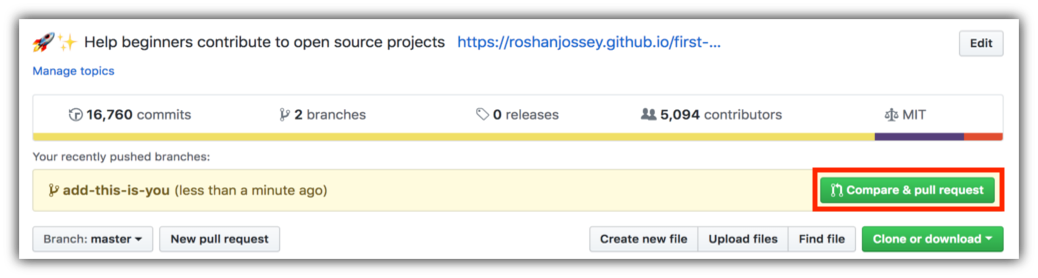 አሁን pull request ያስገቡ።
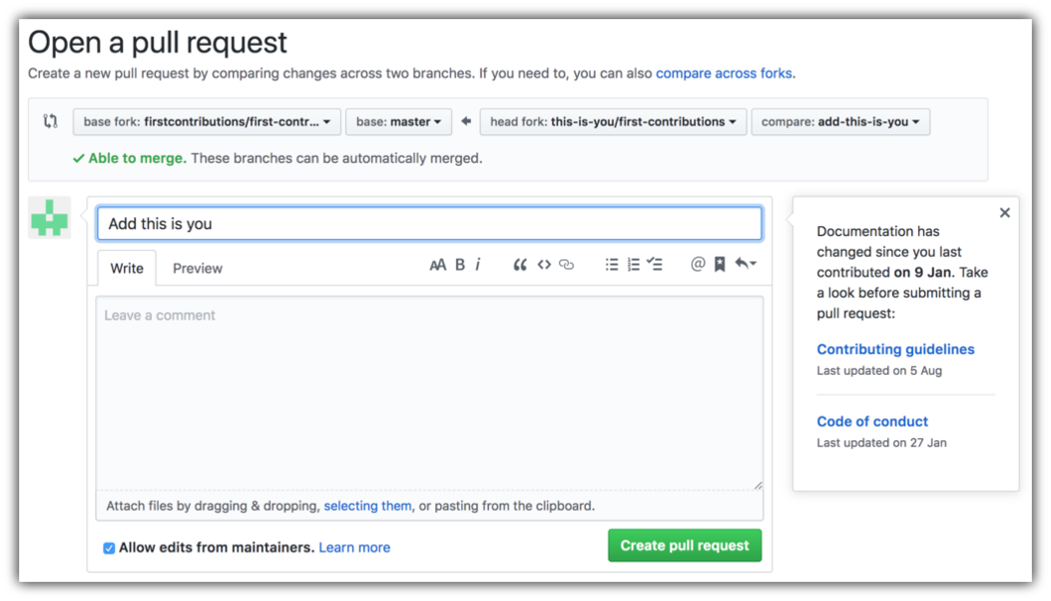 በቅርቡ ሁሉንም ለውጦችዎን ወደዚህ ፕሮጀክት ዋና ቅርንጫፍ አዋህዳቸዋለሁ። ለውጦቹ ከተዋሃዱ በኋላ የማሳወቂያ 'ኢይሜል' ይደርስዎታል።
## ከዚህስ ወዴት ልሂድ?
እንኳን ደስ ያሎዎት! ልክ እንደ አስተዋጽዖ አበርካች የሚያጋጥሙትን መደበኛ _fork -> clone -> edit -> pull request_ የስራ ፍሰትን አጠናቀዋል!
አስተዋጾዎን ያጣጣጥሙ እና ወደ [ድህረ-ግፅ](https://firstcontributions.github.io/#social-share) በመሄድ ለጓደኞችዎ እና ተከታዮችዎ ያካፍሉ።
ተጨማሪ ልምምድ ከፈለጉ በዚህ ሊንክ [code contributions](https://github.com/roshanjossey/code-contributions) ይግቡ.
አሁን ለሌሎች ፕሮጀክቶች በማበርከት እንጀምር። እርስዎ ሊጀምሩባቸው የሚችሉ ቀላል ጉዳዮች ያላቸውን የፕሮጀክቶች ዝርዝር አዘጋጅተናል። [በዚህ ሊንክ በመግባት በድር መተግበሪያ ውስጥ ያሉትን የፕሮጀክቶች ዝርዝር ይመልከቱ።](https://firstcontributions.github.io/#project-list)
## [ተጨማሪ ቁሳቁስ](docs/additional-material/git_workflow_scenarios/additional-material.md)
## የሌሎች መሳሪያዎች አጠቃቀም አጋዥ ስልጠናዎች
|
በቅርቡ ሁሉንም ለውጦችዎን ወደዚህ ፕሮጀክት ዋና ቅርንጫፍ አዋህዳቸዋለሁ። ለውጦቹ ከተዋሃዱ በኋላ የማሳወቂያ 'ኢይሜል' ይደርስዎታል።
## ከዚህስ ወዴት ልሂድ?
እንኳን ደስ ያሎዎት! ልክ እንደ አስተዋጽዖ አበርካች የሚያጋጥሙትን መደበኛ _fork -> clone -> edit -> pull request_ የስራ ፍሰትን አጠናቀዋል!
አስተዋጾዎን ያጣጣጥሙ እና ወደ [ድህረ-ግፅ](https://firstcontributions.github.io/#social-share) በመሄድ ለጓደኞችዎ እና ተከታዮችዎ ያካፍሉ።
ተጨማሪ ልምምድ ከፈለጉ በዚህ ሊንክ [code contributions](https://github.com/roshanjossey/code-contributions) ይግቡ.
አሁን ለሌሎች ፕሮጀክቶች በማበርከት እንጀምር። እርስዎ ሊጀምሩባቸው የሚችሉ ቀላል ጉዳዮች ያላቸውን የፕሮጀክቶች ዝርዝር አዘጋጅተናል። [በዚህ ሊንክ በመግባት በድር መተግበሪያ ውስጥ ያሉትን የፕሮጀክቶች ዝርዝር ይመልከቱ።](https://firstcontributions.github.io/#project-list)
## [ተጨማሪ ቁሳቁስ](docs/additional-material/git_workflow_scenarios/additional-material.md)
## የሌሎች መሳሪያዎች አጠቃቀም አጋዥ ስልጠናዎች
|  |
|  |
|  |
|  |
|  |
|  |
| ----------------------------------------------------------------------------------------------------------------------------------------------------------- | --------------------------------------------------------------------------------------------------------------------------------------------------------------------------------------------------- | -------------------------------------------------------------------------------------------------------------------------------------------------------------------------------------------- | -------------------------------------------------------------------------------------------------------------------------------------------------------------------------------------------- | ------------------------------------------------------------------------------------------------------------------------------------------------------------------------------------------------------------ | -------------------------------------------------------------------------------------------------------------------------------------------------------------------------------------------------------------------------------- |
| [GitHub Desktop](https://github.com/firstcontributions/first-contributions/blob/main/docs/gui-tool-tutorials/github-desktop-tutorial.md) | [Visual Studio 2017](https://github.com/firstcontributions/first-contributions/blob/main/docs/gui-tool-tutorials/github-windows-vs2017-tutorial.md) | [GitKraken](https://github.com/firstcontributions/first-contributions/blob/main/docs/gui-tool-tutorials/gitkraken-tutorial.md) | [Visual Studio Code](https://github.com/firstcontributions/first-contributions/blob/main/docs/gui-tool-tutorials/github-windows-vs-code-tutorial.md) | [Atlassian Sourcetree](https://github.com/firstcontributions/first-contributions/blob/main/docs/gui-tool-tutorials/sourcetree-macos-tutorial.md) | [IntelliJ IDEA](https://github.com/firstcontributions/first-contributions/blob/main/docs/gui-tool-tutorials/github-windows-intellij-tutorial.md) |
|
| ----------------------------------------------------------------------------------------------------------------------------------------------------------- | --------------------------------------------------------------------------------------------------------------------------------------------------------------------------------------------------- | -------------------------------------------------------------------------------------------------------------------------------------------------------------------------------------------- | -------------------------------------------------------------------------------------------------------------------------------------------------------------------------------------------- | ------------------------------------------------------------------------------------------------------------------------------------------------------------------------------------------------------------ | -------------------------------------------------------------------------------------------------------------------------------------------------------------------------------------------------------------------------------- |
| [GitHub Desktop](https://github.com/firstcontributions/first-contributions/blob/main/docs/gui-tool-tutorials/github-desktop-tutorial.md) | [Visual Studio 2017](https://github.com/firstcontributions/first-contributions/blob/main/docs/gui-tool-tutorials/github-windows-vs2017-tutorial.md) | [GitKraken](https://github.com/firstcontributions/first-contributions/blob/main/docs/gui-tool-tutorials/gitkraken-tutorial.md) | [Visual Studio Code](https://github.com/firstcontributions/first-contributions/blob/main/docs/gui-tool-tutorials/github-windows-vs-code-tutorial.md) | [Atlassian Sourcetree](https://github.com/firstcontributions/first-contributions/blob/main/docs/gui-tool-tutorials/sourcetree-macos-tutorial.md) | [IntelliJ IDEA](https://github.com/firstcontributions/first-contributions/blob/main/docs/gui-tool-tutorials/github-windows-intellij-tutorial.md) |